PGGB / Your DAC reimagined

Upscale your DAC.

You chose your DAC for a reason. Give it a music signal prepared with the same care.

PGGB performs high-precision upsampling before the signal reaches your DAC, using up to 256-bit precision. PCM and DSD output are tailored to your DAC’s capabilities. Keep the system you enjoy, and explore what it can do with PGGB.

YOUR DAC / 01

Prepare the digital music before conversion.

Reconstruction comes first.

PGGB’s defining strength is reconstruction accuracy. Within the frequency band you can hear, the new engine makes precision the only limit on reconstruction accuracy. PGGB can perform calculations at up to 256-bit precision, retaining very small differences with extremely little rounding error before your DAC converts the result to analog.

Up to 256-bit
Internal processing precision
PCM or DSD
Output selected for your DAC
Offline or live
Choose how you listen
What affects reconstruction accuracy? ↗

Reducing processing inside your DAC.

Many DACs upsample the digital music using their own digital filters, and upsampling algorithms using their limited on board processing power. PGGB makes use of the full power of your computer to do a near perfect job of upsampling before the signal reaches your DAC.

At suitable input rates, some DACs reduce or completely bypass their internal processing. NOS R2R and direct DSD paths are examples where all processing is bypassed.

Then all your DAC needs to do is what it was designed to do best -- convert the prepared digital music to high quality analog signal.

YOUR DAC / 02

How PGGB prepares the signal.

PCM noise-shaper profiles: low audible-band noise with noise rising above the audible range.

Keep numerical error low.

High-precision calculations continue through resampling, EQ and output conversion. Advanced PCM noise shaping and DSD modulation help retain the high-precision information by keeping quantization noise exceptionally low in the audible band. Preserve the delicate decay of notes and the space around quieter instruments.

PCM and DSD measurements ↗

The right settings for your DAC.

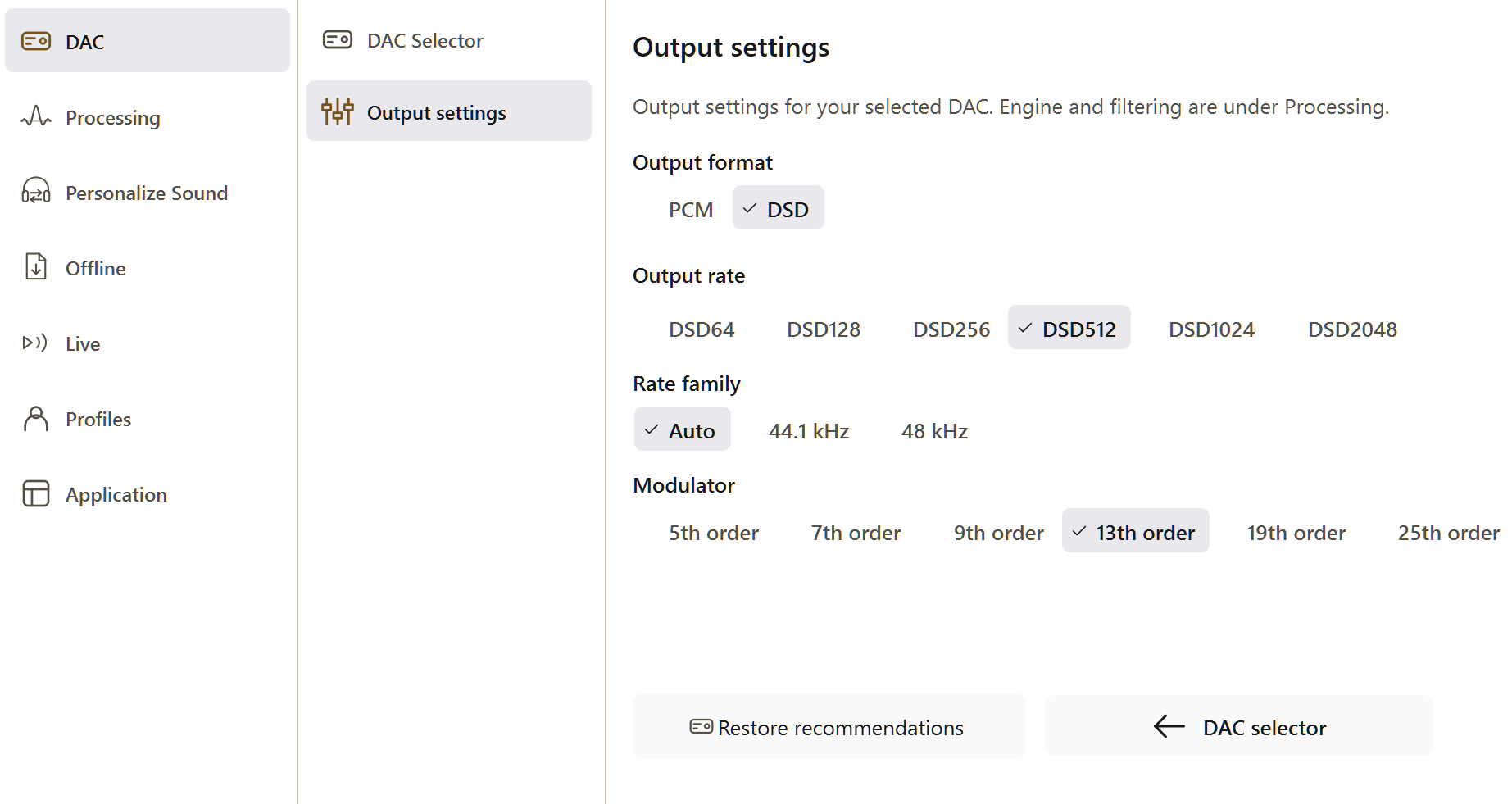
Use a matching DAC preset, then choose the format, rate and PCM bit depth your playback path supports. PGGB’s internal precision is separate from the bit depth sent to your DAC.

Understand the DAC controls ↗

YOUR DAC / 03

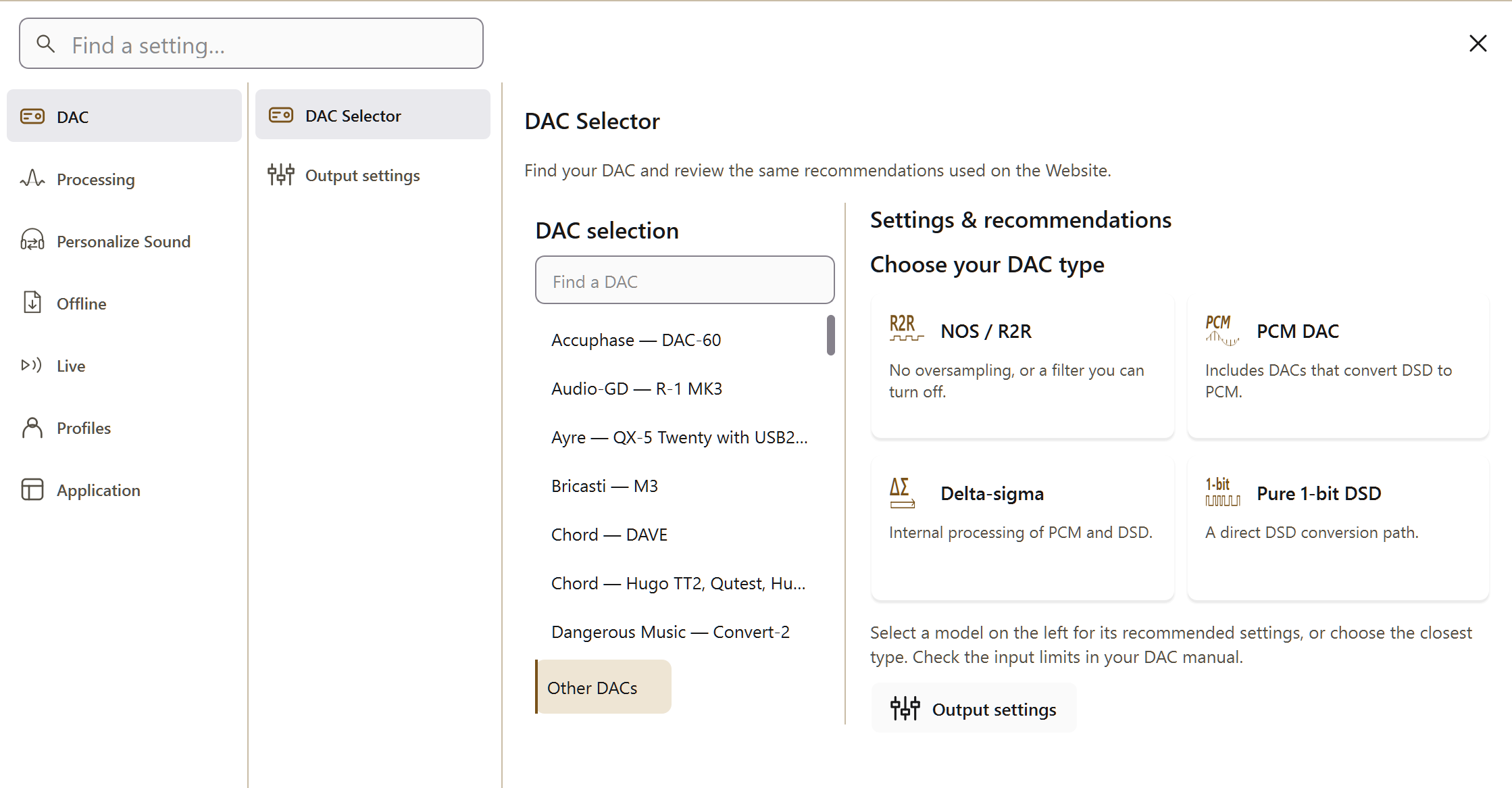
Find settings for your DAC.

Search the recommended combinations, or choose a DAC type if your model is not listed. Your choices carry over to Getting Started.

Choose your DAC.

A collection of DACs on an audio rack

Your recommended settings.

Select a DAC on the left to see its recommended settings here.

If yours isn’t listed, choose Other DACs and then the closest type. You can still set it up with the rates in its manual.

Your selections are saved in this browser.

Reading the recommended settings
4fS
176.4 / 192 kHz
8fS
352.8 / 384 kHz
16fS
705.6 / 768 kHz
32fS
1,411.2 / 1,536 kHz

fS means the 44.1 or 48 kHz base sample rate. Suggested 19- or 20-bit PCM output targets the DAC’s most linear operating range. At 32fS, the USB driver may limit playback to 16 bits.

Other DACs and systems to try

Denafrips Ares II, Pontus II and Venus II share the same recommended settings. Choose Denafrips — Ares II, Pontus II, Venus II in the DAC selector, then check that your connection supports the selected rate.

If your DAC is not listed, choose Your DAC in PGGB and configure its output manually. For DACs supporting DXD and DSD128, try 352.8 kHz PCM or DSD128. PCM-only DACs can play DSD sources converted to PCM; DACs limited to 96 or 192 kHz can receive DSD or DXD sources converted to a supported rate.

Configure a DAC manually ↗

YOUR DAC / 04

Apply the recommended settings.

  1. Load your DAC preset.

    Open Settings → DAC → DAC Selector. Select the matching preset, or choose Other DACs and select a DAC type. You can adjust the output settings and use Restore recommendations to return to the preset’s suggested settings.

    DAC and System settings ↗
  2. Match the format and rate.

    Choose PCM or DSD output supported by the whole playback path. For live playback, first confirm playback at the highest PCM rate supported by both your DAC and PGGB’s calibration, then try DSD. A network endpoint and network connection must support the chosen format and rate.

    Understand live calibration ↗
  3. Choose your processing precision.

    For PCM, start with the highest precision your license tier supports without limits, reducing it if processing is too slow. Keep Precision optimized selected for the default engine. PGGB selects DSD working precision automatically.

    Precision and noise shaping ↗
PGGB Settings: guide dac output pcm. Current Windows application, idle.
PGGB Settings: dac settings. Current Windows application, idle.
One place to match PGGB’s output to your DAC. Open the screenshot for a closer look.

Upsample offline

Process an album for your player.

Save processed files, then play them through a compatible player with additional resampling, EQ and dither disabled. Match the files to the DAC you will use.

Upscale your first album ↗

Listen in real-time

PGGB-Live

Connect your music player to your DAC through PGGB. Use the setup wizard to choose the player route, direct or network output, and remote control.

Configure Live playback ↗

What are you looking for?