PGGB Support

What would you
like to do?

Find help with your first album, Live playback, moving a license or another PGGB question.

Zaphod, ZB’s two-headed avatar
Zaphod’s Blog ↗

Help in the app.

Click the Help icon (question mark) beside the Settings icon to open built-in Help. Browse the Contents, look up a term in the Index, or use Search to find a topic. The help pages are installed with PGGB, so you can read them without an internet connection.

On Windows, focus a control and press F1 to open its help topic. Or press Shift+F1, then click the control. If no help topic covers it, Shift+F1 keeps the short help popup.
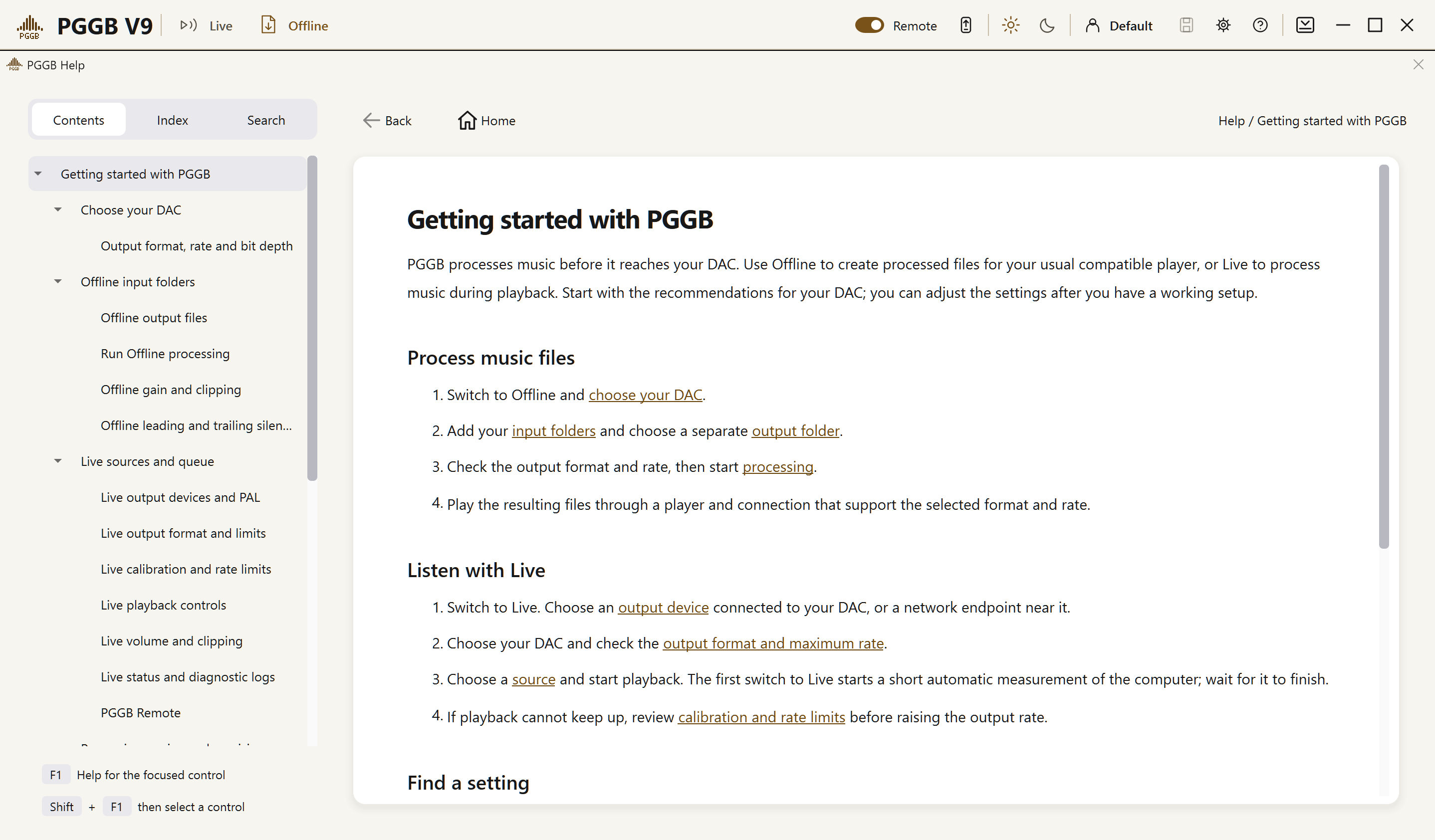
PGGB built-in Help, Contents and Getting started
Built-in Help, with the Help button shown in the app header.

Use Show me in a help topic to find a control. PGGB brings it into view and briefly outlines it. If it is unavailable, a note explains why and how to reach it. A page for the other mode may open with its controls disabled. Show me does not switch modes, change settings or start playback or processing.


Quick routes

Common tasks.

The complete guides

Choose your guide.

Your DAC Reimagined

What sets PGGB apart.

PGGB uses accurate reconstruction to help you get more from your existing DAC. It prepares the signal at a format and rate your DAC supports. Process albums offline or listen through PGGB-Live.

Accuracy at the core
PGGB reconstructs the signal as accurately as the selected precision allows across the audible band, before it reaches your DAC.
Precision throughout
Up to 256-bit calculations preserve numerical accuracy through resampling, EQ and output conversion. Your DAC receives the output bit depth suited to it.
Ultra-low quantization noise
PGGB’s PCM noise shapers and DSD modulators keep quantization noise very low in the audible band, with settings to match what your DAC accepts.
Find your DAC ↗

Quick answers

Common questions.

Should I upsample files offline or use PGGB-Live?

Offline processing saves new PCM or DSD files to play later. PGGB-Live processes music as it plays, without creating a separate upsampled library. Choose the approach that fits how you listen.

Compare the two approaches ↗
Can PGGB produce both PCM and DSD files?

Yes. Choose PCM or DSD output and a rate supported by your DAC. The PGGB Guide explains the output settings and how to configure DSD.

Choose your output settings ↗
Can I keep using Roon, JRiver or another player?

Yes. On the same computer, send your player’s output to PGGB through the PGGB Bridge; across your network, use UPnP. Which one works depends on the player and operating system.

Find your player in the compatibility table ↗
Why is a live output rate unavailable?

The device may not support it, or calibration may have found it too demanding for your computer. Check the status lines below Endpoint before changing the limits.

Understand the rate limits ↗
Does my V8 license work in V9?

Yes. Every V8 license works in V9 without an upgrade charge. Follow the registration and activation instructions for your existing license.

Use your existing V8 license ↗
Can I use EQ and PGGB-ARC with live playback?

EQ and ARC crossfeed work during offline and live processing. Room reflections are available only when processing files offline.

Read about EQ and ARC in PGGB-Live ↗
Do I need a new DAC?

No. Your current DAC will work; check which formats and sample rates it and your player support. Whether the DAC also bypasses its own processing depends on its design.

Get started
What happens after 30 days?

Try PGGB for 30 days. During the trial, PCM processing up to 107-bit precision is unlimited; higher precision and DSD output are limited to two tracks. After 30 days, PGGB continues as the free Lite version.

Does ARC work with PCM and DSD?

Crossfeed and head measurements work with PCM and DSD using the default engine, in Offline and Live. Optional Room reflections are available for offline processing.

How do I move a V9 license?

Install PGGB on the new computer, then use your email address and activation code to select your license. If its activation limit has been reached, confirm the move. The old computer switches to Lite the next time it starts.

Follow the move instructions
Does Remote need its own app?

No. Open PGGB-Remote in a phone or tablet browser on your home network while PGGB is running with Remote enabled on the host computer.

PGGB-Remote guide

Earlier releases

Older versions & downloads.

Looking for an earlier release? Choose your version and platform to find the installer.

These installers are for existing setups. Check that your license covers the version you choose and that it supports your operating system. Keep your current installer and settings before changing versions.

v8 (Rob Reiner Edition)
v7 (2048 Edition)
v7 (Lite Edition)
v7 (Neo Edition)
v6 (DSD Edition)
v5 (Reference Edition)
v3 (Insane Edition)

We’re here to help

Contact us.

When asking for help, include your operating system, DAC, player and a short description of what happened. A log or screenshot can help us understand the problem.

What are you looking for?